
Internationalization vs. Localization: Key Differences Explained
Over 5 billion people use the internet today, yet they don't all speak the same language, follow the same conventions, or expect the same digital experience. Reaching a global audience isn't simply about translating text. It's about creating products that feel familiar to every user, regardless of where they live.
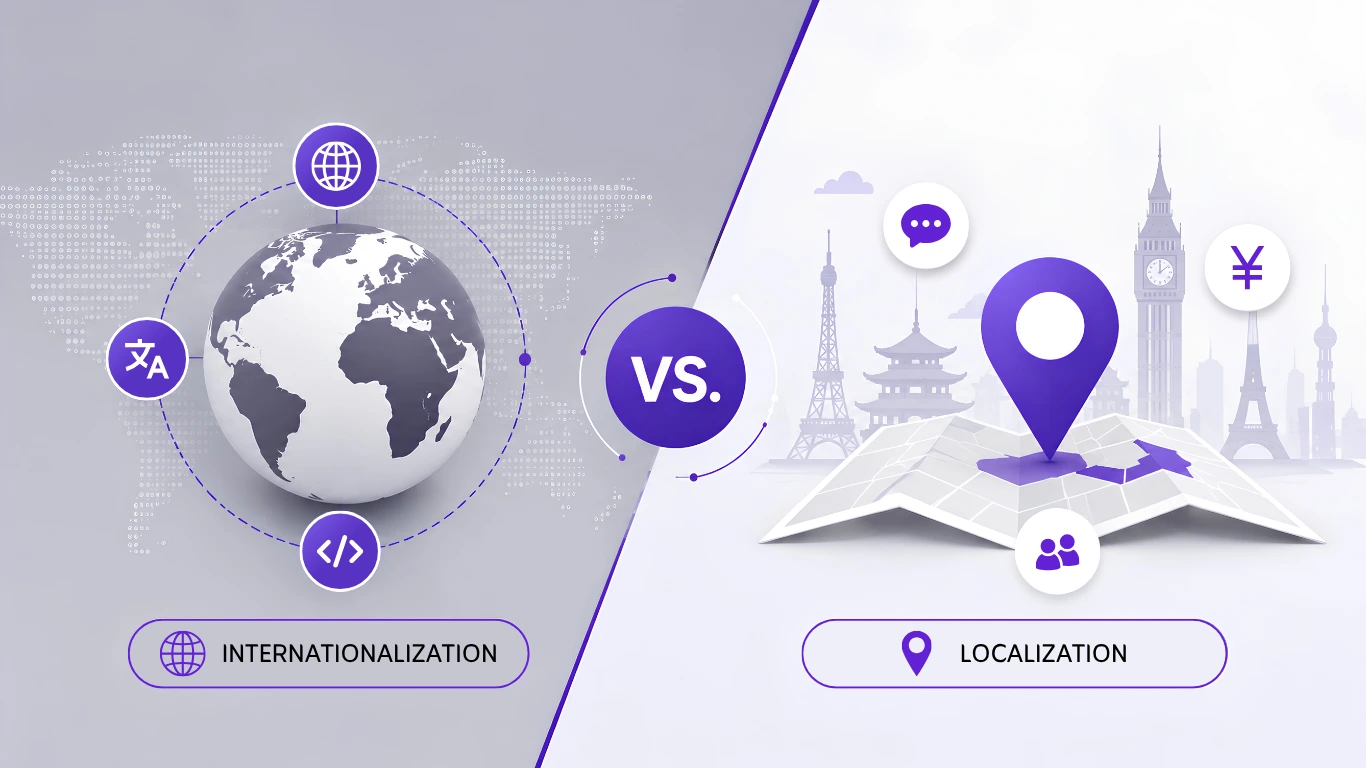
This is where internationalization and localization play a critical role. One prepares your software for multiple languages and regions, while the other adapts it for specific markets and cultures.
In this guide, we'll break down the differences between internationalization and localization, explain why both are essential for global growth, and show how they work together to deliver a seamless user experience.
What Is Internationalization (i18n)?
Internationalization, often abbreviated as i18n, is the process of designing and developing software so it can easily support multiple languages, regions, and cultural preferences without requiring major code changes later.
The abbreviation "i18n" represents the first letter "i," the last letter "n," and the 18 letters between them.
Think of internationalization as building the foundation of a house. Before decorating the interior, you first create a structure that can support everything else. Likewise, internationalization prepares your application for future localization.
Common internationalization tasks include:
- Separating user-facing text from source code
- Supporting Unicode for multiple writing systems
- Handling different date and time formats
- Supporting multiple currencies
- Allowing text expansion for longer translations
- Supporting right-to-left languages such as Arabic and Hebrew
- Formatting numbers according to regional standards
- Making layouts flexible for different languages
Without proper internationalization, every new language may require developers to rewrite parts of the application, increasing both cost and development time.
Example
Imagine you're building an online shopping platform.
Instead of hardcoding this text:
Buy Now
You store it as a translation key:
button.buy
The application can then display:
- English - Buy Now
- Japanese - 今すぐ購入
- French - Acheter maintenant
- Spanish - Comprar ahora
Because the text is separate from the code, adding another language becomes much easier.
What Is Localization (l10n)?
Localization, commonly shortened to "l10n," is the process of adapting a product for a specific language, culture, and regional market.
While translation is an important part of localization, it is only one piece of the puzzle.
Localization ensures users feel that your application was created specifically for them.
A complete localization process may include:
- Translating interface text
- Adapting images and graphics
- Changing colors where culturally appropriate
- Converting currencies
- Formatting dates and times correctly
- Using local measurement units
- Adjusting legal information
- Supporting regional payment methods
- Writing culturally appropriate marketing messages
Example
A food delivery app expanding into Japan would not simply translate English text into Japanese.
It may also:
- Display prices in Japanese Yen
- Show delivery times in the local format.
- Support Japanese addresses
- Accept local payment options
- Use culturally familiar food imagery.
- Adapt promotions to local holidays
This creates a much better user experience than translation alone.
Internationalization vs. Localization: Key Differences
Although internationalization and localization work closely together, they happen at different stages of product development.
| Internationalization (i18n) | Localization (l10n) |
|---|---|
| Happens during development | Happens after the product is internationalized |
| Focuses on technical preparation | Focuses on adapting content for users |
| Requires developers | Requires translators, reviewers, and localization teams |
| Makes products language-ready | Makes products market-ready |
| Supports multiple languages | Adapts to one specific language or region |
| Changes the software architecture | Changes the user experience |
The easiest way to understand the difference is
- Internationalization prepares the product.
- Localization personalizes the product.
Why Are Both Important?
Many organizations believe that simply translating content is enough to reach customers in different countries.
Unfortunately, this approach often leads to poor user experiences.
Imagine opening an app that has been translated into your language, but:
- Prices appear in another country's currency.
- Dates use an unfamiliar format.
- Images don't match your culture.
- Text overlaps buttons because your language is longer.
- Checkout only supports foreign payment methods.
Even with accurate translations, users may quickly lose trust.
Internationalization prevents these technical issues, while localization ensures the experience feels natural and familiar.
Together, they help businesses:
- Reach more customers worldwide
- Improve customer satisfaction
- Increase user engagement
- Build trust in new markets
- Reduce long-term development costs
- Launch new languages more quickly
Real-World Example
Imagine a SaaS company based in the United States that wants to expand into Germany, Japan, and Brazil.
Step 1 - Internationalization
Before content is translated, the application is designed to support localization by:
- Moving all text into translation files
- Creating flexible layouts
- Formatting dates dynamically
- Handling multiple currencies
- Supporting different time zones
The software is now ready for multiple languages.
Step 2 - Localization
Next, localization teams adapt the application for each market.
For Germany:
- Translate content into German
- Display prices in Euros
- Format dates correctly
- Use German legal terminology.
For Japan:
- Translate content into Japanese
- Display Yen pricing
- Support local address formats
- Use culturally appropriate messaging.
For Brazil:
- Translate content into Brazilian Portuguese
- Format currency as Brazilian Real
- Use local payment methods.
- Adjust marketing campaigns for regional preferences
Each market receives an experience that feels native rather than translated.
Common Misconceptions
"Translation is the same as localization."
Not quite.
Translation focuses on converting text from one language to another.
Localization goes further by adapting the entire experience for local users.
"Internationalization is only for large companies."
Modern SaaS startups often plan for international users from day one.
Implementing internationalization early is significantly easier than rebuilding an application later.
"Localization only matters for websites."
Localization benefits websites, mobile apps, desktop software, games, eCommerce platforms, and even customer support systems.
If your audience spans multiple countries, localization can improve both user satisfaction and business growth.
Benefits for Businesses
Organizations that invest in internationalization and localization are better positioned for long-term global growth.
Some of the biggest advantages include:
- Faster expansion into new markets
- Lower localization costs over time
- Improved search visibility in multiple languages
- Better customer experience
- Increased conversion rates
- Higher customer retention
- Easier product maintenance
- Stronger international brand presence
Rather than creating separate versions of the same product, businesses can manage one scalable platform that adapts efficiently to different languages and regions.
Common Internationalization and Localization Mistakes
Many businesses understand the importance of reaching global audiences but still make avoidable mistakes during implementation. These errors can slow expansion, increase development costs, and create a poor user experience.
Here are some of the most common mistakes.
1. Skipping Internationalization
Some teams begin translating content before preparing their application to support multiple languages.
This often leads to hardcoded strings, broken layouts, duplicated code, and expensive rework later.
Planning for internationalization early saves time and reduces technical debt.
2. Ignoring Text Expansion
Not every language uses the same number of characters.
For example, a short English phrase may become much longer in German or French. If your interface is not designed with flexible layouts, translated text can overflow buttons, menus, and forms.
3. Forgetting Regional Preferences
Language is only one part of localization.
Users also expect familiarity:
- Date and time formats
- Number formatting
- Currency symbols
- Address formats
- Units of measurement
- Payment methods
These details help create a seamless user experience.
4. Not Testing Localized Content
Even professionally translated content should be reviewed inside the application.
Localization testing helps identify:
- Missing translations
- Broken layouts
- Incorrect formatting
- Truncated text
- Context errors
Testing before release improves quality and user satisfaction.
Best Practices for Internationalization and Localization
Building a globally ready product becomes much easier when internationalization and localization are included from the beginning.
Follow these best practices to simplify future expansion.
Plan for Global Markets Early
If there is any chance your product will support multiple languages in the future, prepare for it during development.
Adding internationalization after launch is usually more expensive than designing for it from the start.
Separate Content from Code
Never hardcode user-facing text.
Instead, store strings in translation files such as
- JSON
- YAML
- XLIFF
- PO files
This allows translators to work without modifying source code.
Support Unicode
Unicode ensures your application can display characters from languages around the world, including Japanese, Chinese, Korean, Arabic, Hindi, and many others.
Build Flexible User Interfaces
Some languages require more space than others.
Responsive layouts and flexible components help prevent interface issues after translation.
Automate Your Localization Workflow
Modern development teams increasingly use continuous localization.
Instead of manually exporting and importing translation files, automated workflows keep translations synchronized with every code update.
This reduces manual work and speeds up releases.
Work with Native Reviewers
Even high-quality machine translation benefits from human review.
Native speakers can identify cultural nuances, awkward wording, and terminology issues that automated systems may miss.
How Internationalization and Localization Work Together
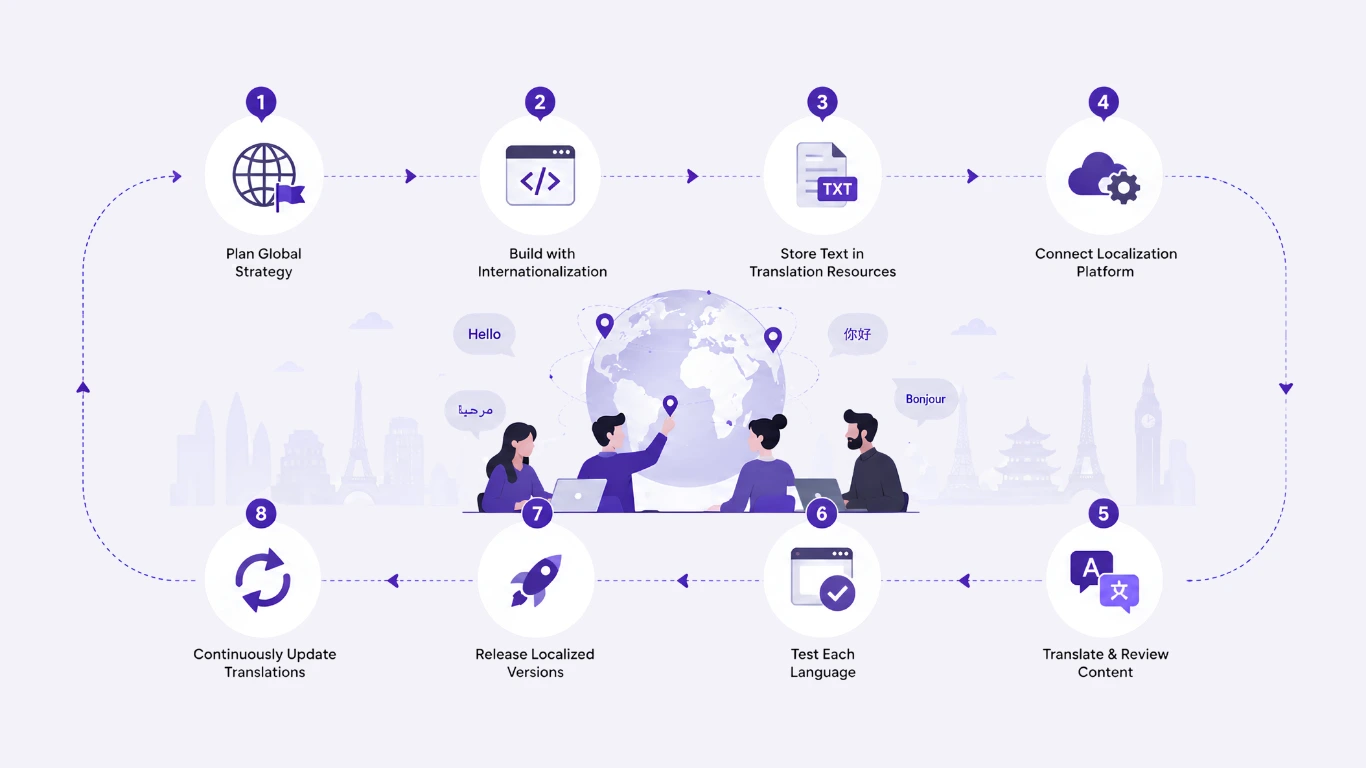
Rather than treating them as separate processes, think of them as two stages of the same workflow.
A typical workflow looks like this:
- Plan your global expansion strategy.
- Build the application with internationalization.
- Store interface text in translation resources.
- Connect your localization platform.
- Translate and review content.
- Test each language.
- Release localized versions.
- Continue updating translations as new features are added.
This approach helps development, design, marketing, and localization teams work together efficiently.
Internationalization vs. Localization - Which Comes First?
Internationalization always comes first.
The software must be technically prepared before it can be adapted for different languages and markets.
A simple way to remember the order is
- Internationalization builds the foundation.
- Localization customizes the experience.
Without internationalization, localization becomes slower, more expensive, and more difficult to maintain.
Conclusion
Expanding into global markets requires more than translation alone. Internationalization prepares your software for multiple languages and regions, while localization adapts the user experience to meet the cultural and linguistic expectations of each target market. Together, they create a seamless experience for users worldwide.
By implementing internationalization and localization early, businesses can accelerate global expansion, reduce development costs, and improve customer satisfaction.
Ready to put internationalization and localization into practice? Clocale helps development and localization teams manage translations in one place, from extracting strings to syncing updates automatically as your product grows.
FAQ
What are the key differences between internationalization and localization?
Internationalization prepares software to support multiple languages, regions, and cultural requirements without requiring significant code changes. Localization then adapts that software for a specific language, culture, and target market, ensuring it provides a natural and relevant user experience.
Is localization just translation?
No. Translation is only one component of localization. While translation converts content from one language to another, localization goes further by adapting currencies, date and time formats, measurements, layouts, images, legal content, and cultural preferences to create a seamless experience for users in each target market.
Why is internationalization important?
Internationalization enables developers to build applications that can support multiple languages, regions, and cultural preferences without requiring major code changes for each new market. This creates a flexible foundation for global expansion.
By implementing internationalization early in the development process, businesses can simplify localization, reduce maintenance costs, accelerate product launches, and deliver a consistent experience across international markets.
What does i18n stand for?
i18n is the standard abbreviation for internationalization. The term begins with the letter "i," ends with "n," and has 18 letters between them, which is where the number 18 comes from.
What does l10n stand for?
"l10n" is the standard abbreviation for "localization." It starts with the letter "l," ends with "n," and has 10 letters between them, which is why the number 10 appears in the abbreviation.
Can small businesses benefit from localization?
Yes. Localization can help small businesses and startups reach international customers by delivering experiences that feel familiar and relevant to each market.
By adapting content, language, and cultural elements, businesses can build trust, improve customer engagement, and increase conversion rates.